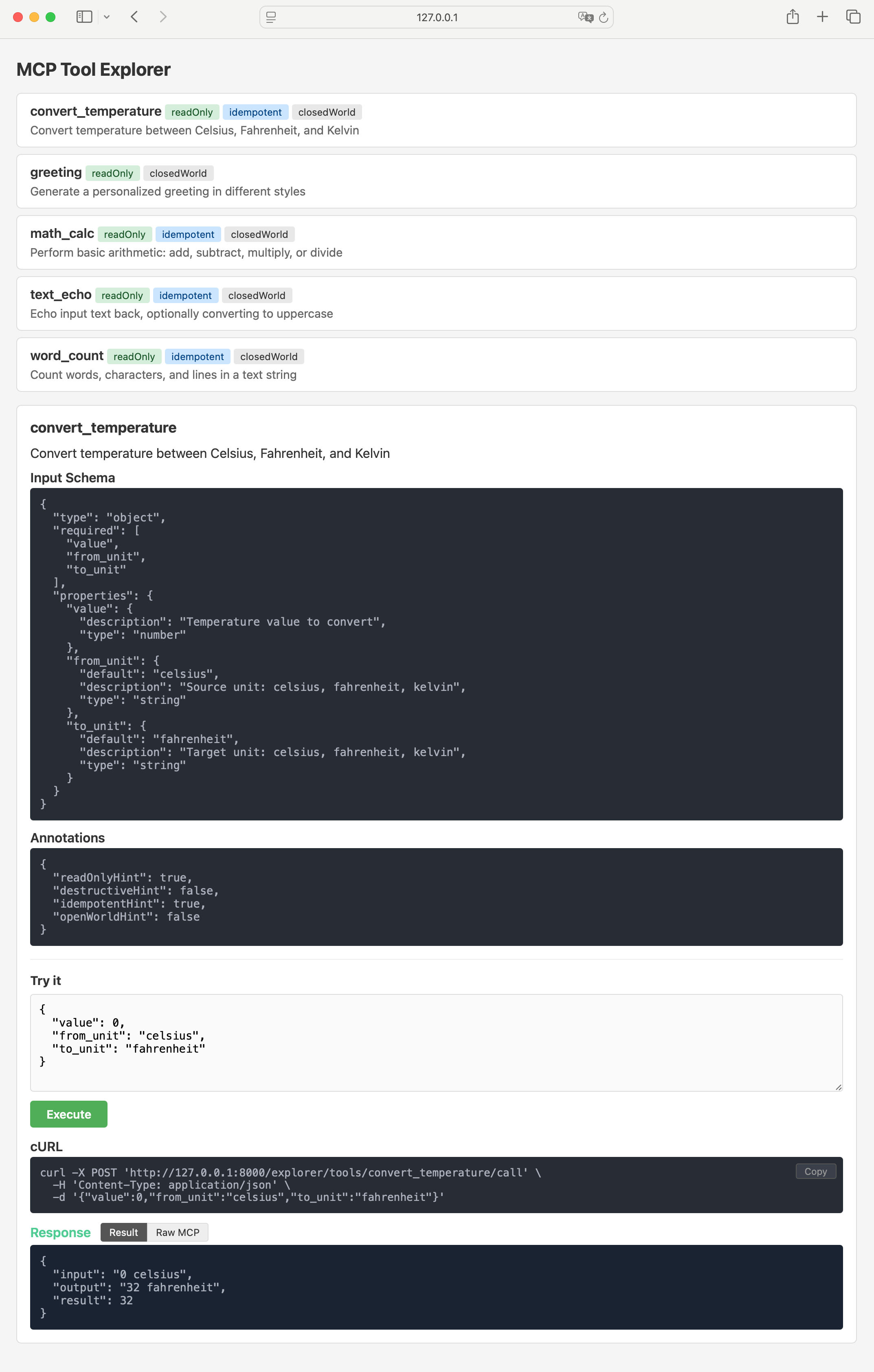
Examples Specification: apcore-mcp Cross-Language Standard¶
| Field | Value |
|---|---|
| Version | 1.2 |
| Date | 2026-04-30 |
| Status | Active |
| Applies | All apcore-mcp-{lang} projects |
Companion contract. This document standardises the examples every apcore-mcp implementation ships. The other half of the compliance surface is the shared behavioural fixtures in
conformance/fixtures/— five JSON files that all three SDKs load and assert against. See that directory'sREADME.mdfor what each fixture pins.
1. Purpose¶
Every apcore-mcp-{lang} implementation MUST ship an examples/ directory with runnable demo modules. These examples serve as:
- Quick start — Users can launch the Explorer UI and interact with tools immediately.
- Integration test — Verifies the full stack (Registry → Executor → MCP Server → Explorer).
- Reference patterns — Demonstrates both module definition styles supported by the language.
2. Required Modules¶
Each implementation MUST provide exactly 5 demo modules:
| Module ID | Category | Description | Annotations |
|---|---|---|---|
text_echo |
Class-based | Echo text back, optionally uppercase | readonly, idempotent, closedWorld |
math_calc |
Class-based | Basic arithmetic (add, sub, mul, div) | readonly, idempotent, closedWorld |
greeting |
Class-based | Personalized greeting in 3 styles (friendly, formal, pirate) | readonly, closedWorld |
convert_temperature |
Zero-code | Celsius / Fahrenheit / Kelvin conversion | readonly, idempotent, closedWorld |
word_count |
Zero-code | Count words, characters, and lines | readonly, idempotent, closedWorld |
2.1 Class-Based Modules¶
Must use the language's native apcore module format (auto-discovered by Registry):
| Language | Format |
|---|---|
| Python | Class with input_schema (Pydantic), output_schema, description, execute() |
| TypeScript | Default export object with inputSchema (TypeBox), outputSchema, description, execute() |
2.2 Zero-Code Modules¶
Must wrap plain business functions without modifying the original source file (myapp.{ext}):
| Language | Mechanism |
|---|---|
| Python | binding.yaml with auto_schema: true + BindingLoader |
| TypeScript | module() factory from apcore-js with explicit TypeBox schemas |
The key principle: myapp.{ext} has zero apcore imports — it is pure business logic.
3. Module Schemas¶
3.1 text_echo¶
Input:
| Field | Type | Default | Description |
|-------|------|---------|-------------|
| text | string | (required) | Text to echo back |
| uppercase | boolean | false | Convert to uppercase |
Output:
| Field | Type | Description |
|-------|------|-------------|
| echoed | string | The echoed text |
| length | integer | Character count |
3.2 math_calc¶
Input:
| Field | Type | Default | Description |
|-------|------|---------|-------------|
| a | number | (required) | First operand |
| b | number | (required) | Second operand |
| op | string | "add" | Operation: add, sub, mul, div |
Output:
| Field | Type | Description |
|-------|------|-------------|
| result | number | Calculation result |
| expression | string | Human-readable expression (e.g., "10 + 3 = 13") |
Error cases: Unknown operation, division by zero.
3.3 greeting¶
Input:
| Field | Type | Default | Description |
|-------|------|---------|-------------|
| name | string | (required) | Name of the person to greet |
| style | string | "friendly" | Greeting style: friendly, formal, pirate |
Output:
| Field | Type | Description |
|-------|------|-------------|
| message | string | The greeting message |
| timestamp | string | ISO 8601 timestamp |
Style templates:
- friendly → "Hey {name}! Great to see you!"
- formal → "Good day, {name}. It is a pleasure to make your acquaintance."
- pirate → "Ahoy, {name}! Welcome aboard, matey!"
3.4 convert_temperature¶
Input:
| Field | Type | Default | Description |
|-------|------|---------|-------------|
| value | number | (required) | Temperature value |
| from_unit | string | "celsius" | Source unit: celsius, fahrenheit, kelvin |
| to_unit | string | "fahrenheit" | Target unit: celsius, fahrenheit, kelvin |
Output:
| Field | Type | Description |
|-------|------|-------------|
| input | string | Input value and unit (e.g., "100 celsius") |
| output | string | Converted value and unit (e.g., "212 fahrenheit") |
| result | number | Numeric result (rounded to 2 decimals) |
3.5 word_count¶
Input:
| Field | Type | Default | Description |
|-------|------|---------|-------------|
| text | string | (required) | Text to analyze |
Output:
| Field | Type | Description |
|-------|------|-------------|
| words | integer | Word count |
| characters | integer | Character count |
| lines | integer | Line count |
4. Directory Structure¶
examples/
├── README.md                  # Language-specific quick start
├── run.{ext}                  # Unified launcher (all 5 modules)
├── extensions/                # Class-based modules (auto-discovered)
│   ├── text_echo.{ext}
│   ├── math_calc.{ext}
│   └── greeting.{ext}
└── binding_demo/              # Zero-code wrapping demo
    ├── myapp.{ext}            # Plain business logic (NO apcore imports)
    ├── run.{ext}              # Zero-code-only launcher
    └── extensions/            # (Python only: binding.yaml files)
4.1 Rust layout¶
Cargo requires each example to be its own target, so the tree above cannot be reproduced literally in Rust. The equivalent layout, which satisfies this standard:
examples/
├── run/
│   ├── main.rs                # Unified launcher (= examples/run.{ext})
│   └── modules.rs             # All 5 module definitions
├── extensions/
│   ├── main.rs                # Class-based-only launcher
│   └── modules.rs             # The 3 class-based modules
└── binding_demo/
    ├── main.rs                # Zero-code-only launcher (= binding_demo/run.{ext})
    └── myapp.rs               # Plain business logic (no apcore imports)
Rust also has no directory auto-discovery (see the CHANGELOG's Known limitations (Rust)), so every
Rust launcher builds a Registry in code and passes an Arc<Executor> to .backend(...) instead of
pointing at extensions/. That is the expected shape for Rust, not a deviation from §5.
4.2 TypeScript note¶
TypeScript has examples/binding_demo/ but no binding_demo/extensions/ directory: the zero-code
demo uses the module() factory per §2.2 rather than binding.yaml files, which are Python-only.
5. Launcher Requirements¶
5.1 Unified Launcher (examples/run.{ext}, or examples/run/main.rs in Rust)¶
Must:
1. Discover all 3 class-based modules via Registry.discover() — or, in Rust, register them
explicitly (there is no discover() equivalent; see §4.1)
2. Load/wrap all 2 zero-code modules into the same registry
3. Print module counts: class-based, zero-code, total
4. Launch MCP server with transport=streamable-http, host=127.0.0.1, port=8000, explorer=true, allowExecute=true
5.2 Zero-Code Launcher (examples/binding_demo/run.{ext}, or examples/binding_demo/main.rs in Rust)¶
Must: 1. Load only the 2 zero-code modules 2. Launch MCP server with the same options
6. Explorer /call and /validate Response Contract¶
The Explorer /call API endpoint MUST return MCP-compliant CallToolResult format. In addition, the /validate endpoint shipped in mcp-embedded-ui 0.4.0 (EUI-1, CHANGELOG 0.14.0) is exposed for schema-only preflight checks: POST /tools/{name}/validate — schema-only validation; returns {valid: bool, errors: [...], requires_approval: bool} without invoking the tool.
// Success (HTTP 200)
{
  "content": [{"type": "text", "text": "{\"words\":2,...}"}],
  "isError": false,
  "_meta": {"_trace_id": "uuid"}  // optional, only when traceId available
}

// Error (HTTP 500)
{
  "content": [{"type": "text", "text": "error message"}],
  "isError": true
}
7. Explorer UI Display Contract¶
After the user clicks Execute, the Explorer frontend MUST render three sections in order:
7.1 cURL Command¶
Show the equivalent curl command for the request, with a Copy button.
┌─ cURL ──────────────────────────────────────────────────┐
│ curl -X POST 'http://127.0.0.1:8000/explorer/tools/…'\ │ [Copy]
│   -H 'Content-Type: application/json' \                 │
│   -d '{"text": "hello world"}'                          │
└─────────────────────────────────────────────────────────┘
Requirements:
- URL MUST be the full absolute URL (window.location.origin + Explorer base + /tools/{name}/call).
- Single quotes in the JSON body MUST be shell-escaped ('\'').
- Copy button MUST use navigator.clipboard.writeText() and show brief "Copied!" feedback.
- cURL section MUST appear for both success and error responses.
7.2 Response — Tabbed View (success)¶
On success (isError: false), show a tabbed response with two views:
Response  [Result ✓] [Raw MCP]
┌─────────────────────────────────────┐
│ {                                   │   ← "Result" tab (default, active)
│   "words": 2,                       │
│   "characters": 11,                 │
│   "lines": 1                        │
│ }                                   │
└─────────────────────────────────────┘
| Tab | Content | Purpose |
|---|---|---|
| Result (default) | Parsed content[].text — JSON-parsed if valid, raw text otherwise. Single-item arrays unwrapped. |
Friendly view for end users |
| Raw MCP | Full MCP CallToolResult JSON (content, isError, _meta) |
Protocol debugging for developers |
7.3 Response — Error View¶
On error (isError: true), show the error text directly (no tabs):
Response — Error
┌─────────────────────────────────────┐
│ Division by zero                    │
└─────────────────────────────────────┘
Error text is extracted from content[].text blocks joined with newlines.
7.4 Implementation Notes¶
defaultFromSchema()MUST use!= null(not!== undefined) to skip bothnullandundefineddefaults, falling through to type-based placeholders.- All dynamic content MUST be HTML-escaped before insertion to prevent XSS.
8. Compliance Checklist¶
For each new apcore-mcp-{lang} implementation:
- [ ] 5 modules present with matching IDs and schemas
- [ ] Class-based modules use language-native apcore format
- [ ] Zero-code modules wrap
myapp.{ext}without modifying it - [ ] Unified launcher discovers all 5 and serves on port 8000
- [ ] Explorer UI shows all 5 tools with correct annotations
- [ ] Tool execution returns correct results for all 5 modules
- [ ]
defaultFromSchema()skipsnulldefaults (!= nullcheck) - [ ]
execTool()shows cURL command with Copy button - [ ]
execTool()shows tabbed Result / Raw MCP response on success - [ ]
execTool()shows cURL + error text on error
Appendix: Explorer UI Reference¶